
How to stop orders with only the shipping protection product in Shopify
Updated
To stop protection-only orders, stop them at checkout, not only in the cart. Shopify lets anyone buy any active product on its own, so an order can come in with only the protection and nothing to ship. Some of these orders never pass through your cart at all. Happy Bundle includes a free checkout check that stops any checkout holding only the protection.
Why it takes an app
Only an app can add a check to Shopify's checkout; changes to your theme only reach your own cart pages. The same app can offer protection where it sells: two checkout buttons, Protected checkout and Checkout without protection, in the cart drawer and on the cart page.
How a protection-only order gets through
- Fraud tests: people trying out stolen card numbers often buy the cheapest item in a store. Protection at a few dollars is often the cheapest.
- Orders that skip your cart: a shared link or another app can put a product straight into checkout, so anything your cart page would have removed never gets the chance.
- Leftovers from old apps: an app you removed can leave its protection product active and published, sometimes to more channels than your store.
- The other products are gone: a shopper can remove the last product on a page where your code does not run, or the items can be gone by the time they pay.
Block it with Happy Bundle (free)
- Set up package protection in Happy Bundle. Happy Bundle knows which product is the protection.
- Open the Checkout and orders card in the package protection editor and click the button. Shopify asks for your OK once.
- Check it in Shopify. In Settings, Checkout, the Happy Bundle rule is listed under checkout rules and turned on. If you ever turn it off there, Happy Bundle tells you in the editor and never turns it back on by itself.
- That's it. The cart stays editable as usual; the rule only acts when the shopper tries to check out.
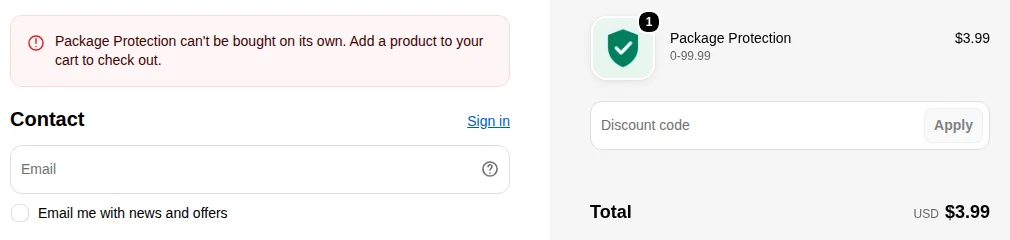
What the rule blocks and what it lets through
- Blocked: a checkout with the protection and nothing that ships, however it got there.
- Allowed: the protection with any product that ships.
- Not judged: a cart of only digital items or gift cards, with no protection in it. The rule only looks at carts that hold the protection.
- Languages: the message shows in the shopper's checkout language, in 14 languages, and in English otherwise.
A five-minute product check
- In Products, search for protection, shipping and insurance.
- Archive every protection product from an app you no longer use.
- Open the protection product you do use and, under Publishing, keep only the Online Store, so ads, feeds and marketplaces never list it.
- If an order with only the protection came in, cancel and refund it, and check it against Shopify's fraud analysis on the order page.
Questions merchants ask
How do I stop customers from checking out with only the shipping protection product in Shopify?
Turn on a checkout check that stops a checkout holding the protection and nothing that ships. Happy Bundle includes one for free; turn it on once in the Checkout and orders card of the package protection editor.
Isn't removing the protection from an empty cart enough?
No. Your cart page only sees shoppers who go through it. Some orders skip it, so the stop has to happen at checkout.
Why did I get an order with only shipping protection?
Most often someone testing a stolen card on the cheapest item they can find. Check the order's fraud analysis, cancel and refund it, and turn on the checkout check so it can't happen again.
Does the checkout check block digital products?
No. It only acts on carts that hold the protection product. A cart of digital items or gift cards checks out as usual.
Does it cost extra?
No. The checkout check is part of Happy Bundle's free package protection.
Read next
- Package protection, freeKeep 100% of what shoppers pay
- Add shipping protectionStep by step
Try Happy Bundle on your store
Install it from the Shopify App Store and create your first offer. Free forever for stores that install now. Every feature, no revenue cap. If paid plans come later, they are only for new stores. Yours stays free.
happy