
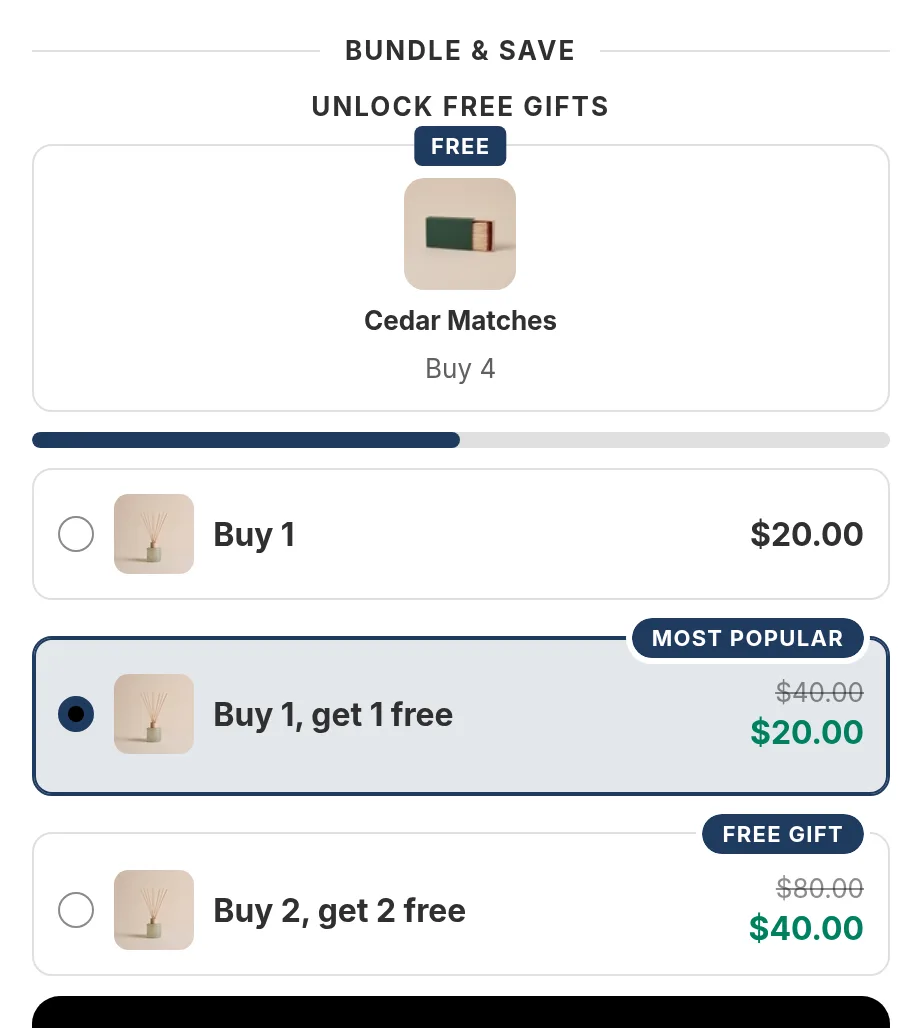
Buy one get one free, shown right on the product page
Run buy one get one free, buy 2 get 1 free, or buy one and get the second at half price. Shoppers see the deal next to the add to cart button and Shopify applies it at checkout.
happy
Free forever for stores that install now. Every feature, no revenue cap. If paid plans come later, they are only for new stores. Yours stays free.
Shopify's own Buy X get Y, and when an app helps
Shopify has a built-in Buy X get Y discount, and for a simple deal it may be all you need. Shopify's help center notes some limits:
- "The free or discounted 'get' item is never automatically added to the cart." Shoppers have to add it themselves.
- There is no widget: shoppers only learn about the deal if you tell them on the page.
- "For all plans except Shopify Plus: All products that are part of a Buy X get Y discount are ineligible for further product discounts."
Happy Bundle shows the deal as a choice on the product page, with the price for the whole set, and adds the right number of items in one click. Source: Shopify Help Center, Buy X get Y discounts, read on 2026-10-07. More in bundles without an app.
BOGO offers you can build
Buy 1, get 1 free
A tier of 2 items with 1 free unit. The cheaper item is the free one.
Buy 2, get 1 free
A tier of 3 items with 1 free unit. Add a Buy 4, get 2 free tier for bigger orders.
Second item half price
A tier of 2 items with a set price or an amount off, for example 2 for $30.
Buy X, get Y
A bundle offer where buying one product gives another product free or at a discount.
A free gift at a tier
Buy 2 and a gift product is added free. See free gifts.
Each item in its own size
Shoppers pick a size and color for every item in the deal, the free one included.
Set up BOGO in three steps
- Install Happy Bundle and turn on its app embed in your theme editor.
- Create a quantity break, add a tier of 2 items and set it to 1 free unit.
- Check the preview and publish. The cart and checkout show the free item as a discount.
Questions merchants ask
How do I do buy one get one free on Shopify?
You can use Shopify's built-in Buy X get Y discount, where shoppers add both items themselves. Or you can use an app that shows the deal on the product page.
With Happy Bundle, you create a quantity break with a tier of 2 items and 1 free unit. Shoppers choose the tier, pick their sizes, and the free item is taken off at checkout.
Which item is free in a buy 2 get 1 free deal?
The cheapest item in the tier is the free one, so a shopper who mixes sizes gets the lowest priced size free.
Can shoppers still use a discount code with BOGO?
Yes, an order discount code or a free shipping code can apply on top when the code is set to combine with product discounts. A second product discount on the same item is only possible on Shopify Plus, which is Shopify's rule.
Is the free item added to the cart automatically?
When a shopper chooses the BOGO tier, Happy Bundle adds all the items of that tier to the cart at once, the free one included.
Read next
- Volume discountsTiers like Buy 2, save 10%
- Free giftsA gift at a tier or over a cart amount
- Discount codes and bundlesHow codes combine with offers
Try Happy Bundle on your store
Install it from the Shopify App Store and create your first offer. Free forever for stores that install now. Every feature, no revenue cap. If paid plans come later, they are only for new stores. Yours stays free.
happy