
Do bundle discounts work on Shopify draft orders?
Updated
Yes, with Happy Bundle: an order you create in the Shopify admin (a draft order) gets your quantity breaks, BOGO, bundles, mix and match, add-ons and free gifts automatically, at the price your online store charges.
What it looks like
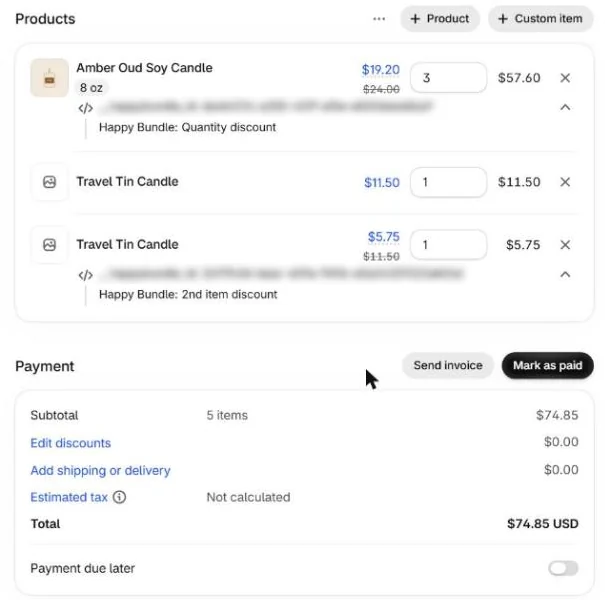
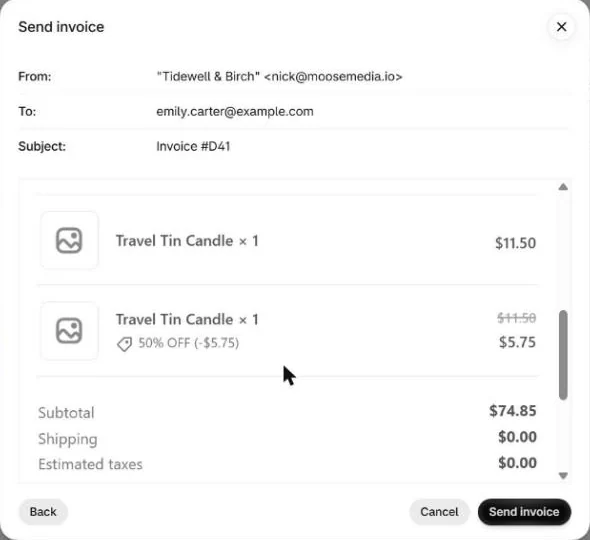
A real draft order on our test store: 3 candles with a buy 3, save 20% quantity break and 2 tins with the second at 50% off.

Why offers go missing in draft orders
When you type items into a draft order, Shopify only applies automatic discounts if Apply all eligible automatic discounts is turned on for that draft. Even then, offers that depend on how the online cart is put together are left out: in our tests on our own test stores, a hand-typed draft order charged full price for free gifts, add-ons, buy one get one on the same item, and bundles with a chosen size or color.
Online, Happy Bundle's widget adds a small note to each cart line saying which offer it belongs to. A draft order has no widget, so Happy Bundle writes the same notes onto the draft's lines itself (you see them under each line, for example "Happy Bundle: Quantity discount"), splits a line where the online cart would (1 at full price + 1 at 50% off for a same item BOGO), adds a free gift line when one is earned, and turns on automatic discounts. Shopify then prices the draft with the same Happy Bundle discount it uses at checkout.
Which offers apply in a draft order
| Offer | In a draft order with Happy Bundle |
|---|---|
| Quantity breaks and volume discounts, tiered pricing, price per item by quantity | Applied, across sizes and colors like online |
| BOGO and buy X get Y, including buy one get one on the same item | Applied: the line is split so the second unit gets its discount |
| Product bundles, including a chosen size or color per item | Applied; you pick the items of a bundle in the Happy Bundle dialog on the draft |
| Mix and match | Applied. If an item in the set also has its own quantity break, the draft gets that item's own quantity break instead of the set price |
| Add-ons, including add-ons included free | Applied |
| Free gifts at a quantity tier or over a cart amount | Applied: the gift line is added when the draft earns it |
Checked line by line against the same cart in the online store, to the cent, on our own test stores, with and without a discount code and with a consultant-style automatic discount from 15% to 50%.
How to use it
- Create orders as usual. In Shopify, go to Orders, Drafts, Create order, add the customer and the items, and save. Shopify's page doesn't refresh by itself: reload it to see the discounted lines, then send the invoice or collect payment.
- Check the setting. In Happy Bundle, Settings, Storefront, the switch Apply Happy Bundle offers to manual orders automatically is on by default.
- Add the Happy Bundle block (optional). Open any draft order, scroll to Blocks, click + Block, choose Happy Bundle offers, then click the pin icon. It then shows on every draft order.
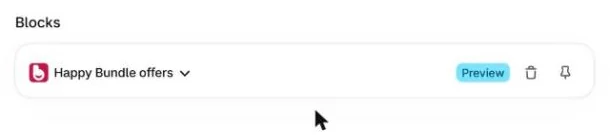
The Happy Bundle block on a draft order
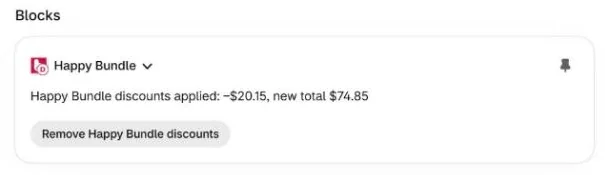
- Happy Bundle discounts applied: -$X, new total $Y: the draft has every offer it qualifies for. Reload the page to see the new lines.
- Not applied yet, with the reason and an Apply now button, for example when you were still editing the draft.
- Can't apply, with what to change: a line has its own custom discount or custom price, or an invoice was already sent.
- Remove Happy Bundle discounts: takes Happy Bundle's changes off this one draft exactly, and Happy Bundle then leaves that draft alone. Apply Happy Bundle discounts puts them back, also on older open drafts.
The block shows only on draft orders with items in a Happy Bundle offer. Happy Bundle also adds Apply Happy Bundle offers under More actions on those drafts.
Phone orders, invoices, consultants and wholesale
- Phone and email orders, orders for a customer: create the draft as usual; the offers apply while you build it.
- Invoices: send the invoice after the block shows the offers applied. Once an invoice is sent, Happy Bundle no longer changes that draft.
- Consultants, sales reps and staff: a customer or consultant discount you run as a Shopify automatic discount or a discount code stays on the order and combines with the offers as it does online (see discount codes and bundles).
- Wholesale: quantity breaks and price per item by quantity apply to big quantities in a draft order like online, with no customer login needed. We have not tested orders for Shopify B2B companies with their own catalogs or price lists yet; please try one and tell us if it behaves differently.
What is not changed
- Completed or paid orders: never changed. Happy Bundle only works on open draft orders.
- A draft whose invoice was sent: left as it is.
- A line with its own custom discount or custom price: Happy Bundle doesn't apply offers to that draft until you remove it, so your own price is never overwritten.
- A draft that changes many times within an hour: automatic apply pauses for it; click Apply now in the block.
- Very large drafts with too many lines to split: make a smaller draft order.
- Shopify's own rules for draft orders still apply. For example, Buy X get Y discount codes can't be used on draft orders; Happy Bundle's BOGO offers are not codes, so they are not affected.
Questions merchants ask
Do automatic discounts apply to Shopify draft orders?
Only when Apply all eligible automatic discounts is turned on for that draft order. Happy Bundle turns it on for drafts that have items in a Happy Bundle offer, and sets up the lines so its offers apply like online.
What is a draft order in Shopify?
An order you create yourself in the Shopify admin, under Orders, Drafts, Create order: for a phone or email order, a customer you serve in person, or a wholesale order. You send it as an invoice or collect payment, and it becomes a regular order when it is paid or completed.
Is there a Shopify bundle app whose discounts apply to draft orders automatically?
Yes. Happy Bundle applies its quantity breaks, BOGO, bundles, mix and match, add-ons and free gifts to draft orders by itself, priced like the online cart, and shows the status in a block on the draft.
Why doesn't my buy one get one offer apply to a draft order?
A same item BOGO needs the second unit on its own cart line, which the online widget does for the shopper. In a typed draft both units sit on one line. Happy Bundle splits that line for you, so the second unit gets its discount.
Do I have to apply the offers before I send the invoice?
Happy Bundle applies them while you build the draft. Check that the block shows the offers applied, then send the invoice. After an invoice is sent, Happy Bundle doesn't change that draft.
Can I still give a custom discount on a draft order?
Yes, with one catch. A discount code or an automatic discount stays on the order and combines as usual. But a custom discount or custom price on a single line stops Happy Bundle from applying its offers to that draft, so your price is kept as you set it.
Can I remove the Happy Bundle discounts from one draft order?
Yes. Click Remove Happy Bundle discounts in the block. Happy Bundle takes off exactly what it added and leaves that draft alone until you click Apply Happy Bundle discounts.
Does Happy Bundle change orders that are already paid?
No. Completed and paid orders are never changed; Happy Bundle only works on open draft orders.
Does it cost extra?
No. Draft order support is part of Happy Bundle, with no extra charge.