
How do I give a bundle or quantity discount only to specific customers on Shopify?
Updated
With Happy Bundle, a free Shopify bundle and quantity break app, you can limit any offer to the customers you choose: customers with a tag such as VIP, member or wholesale, customers on their first order, or everyone except customers with a tag or B2B company buyers. The offer shows only to those customers, and the discount is checked again at checkout.
Who gets the offer
| Setting in Happy Bundle | Gets the offer | Pays the normal price |
|---|---|---|
| Customers: Tagged, with tags such as VIP, member, wholesale | Logged-in customers with any one of the tags | Guests and customers without the tags |
| Hide from tags, such as staff, reseller | Everyone else, guests included | Customers with any one of the tags |
| Customers: First order only | Customers with no orders yet, and guests whose email has no orders | Customers who have ordered before |
| Exclude B2B customers | Shoppers buying for themselves | Customers buying for a company (Shopify B2B) |
The settings combine. For example: customers tagged VIP on their first order, hidden from staff.
Set it up
- Tag your customers in Shopify. In the Shopify admin, open Customers, choose a customer and add a tag, for example VIP or wholesale. Upper or lower case does not matter.
- Open the offer in Happy Bundle. Create a quantity break, bundle or other offer, or open one you already have.
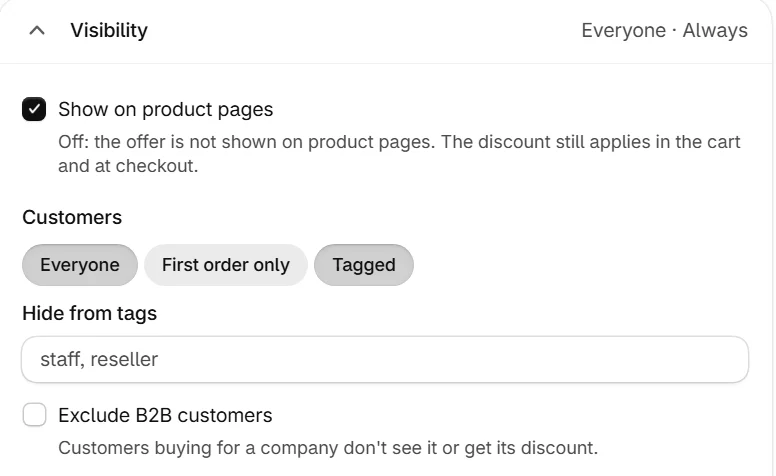
- Choose who it is for. In the Visibility section, under Customers, pick First order only, or Tagged and type the tags. Type tags under Hide from tags to keep customers out, and tick Exclude B2B customers if company buyers should not get it.
- Save. Customers with the tag get the offer when they are logged in to your store.
Wholesale prices for tagged customers
Many stores sell to retail and wholesale customers from the same online store. Give your wholesale customers a tag such as wholesale, and create a quantity break that is only for that tag, for example 10 for $8 each, 50 for $6 each. Retail shoppers keep your normal offers, and you can keep a retail offer away from wholesale customers with Hide from tags.
Shopify's own B2B features give price breaks to buyers who log in as part of a company. Happy Bundle's tag offers work for any logged-in customer with the tag, without setting up companies. See tiered pricing and price per item by quantity for how the two compare.
10% off the first order, or a first-order bundle
For a plain percentage off a customer's first order, Shopify's own discounts can be limited to a customer segment, such as customers with no orders yet. Happy Bundle adds the offers that Shopify's discounts don't draw on the product page: a first-order quantity break, BOGO or bundle, shown on the product page and checked at checkout.
Why the price is safe at checkout
- Guests are not shown an offer that is only for tagged customers.
- At checkout, Happy Bundle's discount looks at the customer again: their tags, their order count and whether they buy for a company. Someone the offer is not for pays the normal price, even with the offer in their cart.
- A customer who has ordered before pays the normal price on a first-order offer.
Questions merchants ask
How do I show a bundle or quantity discount only to VIP customers with a tag on Shopify?
Tag the customers VIP in Shopify, then in Happy Bundle open the offer and choose Customers: Tagged and type VIP. Logged-in VIP customers get the discount; other shoppers pay the normal price.
Can I give quantity breaks only to logged-in members?
Yes. Tag your members, for example member, and limit the quantity break to that tag. Guests do not see it until they log in.
How do I give a bundle discount to new customers only, on their first order?
Choose Customers: First order only on the offer in Happy Bundle. Customers who have ordered before do not see it, and the discount is checked again at checkout.
How do I exclude wholesale or staff customers from an automatic discount?
Type their tag, for example wholesale or staff, under Hide from tags on the Happy Bundle offer. To keep Shopify B2B company buyers out, tick Exclude B2B customers.
Does this cost extra?
No. Happy Bundle is free, with every feature included.
Read next
- Quantity breaksBuy more, pay less per item
- Tiered pricingPrice per item by quantity
- BOGOBuy one get one and buy X get Y
Try Happy Bundle on your store
Install it from the Shopify App Store and create your first offer. Free forever for stores that install now. Every feature, no revenue cap. If paid plans come later, they are only for new stores. Yours stays free.
happy