
How to add shipping protection to your Shopify cart
Updated
To add shipping protection in Shopify, you sell it as a product and offer it in the cart, at the moment of checkout. Happy Bundle does this for free: your checkout button becomes Protected checkout and Checkout without protection. You can also add a plain product by hand, with real drawbacks.
Why an app does this better
Protection only sells when it is offered in the cart drawer and on the cart page with the price for that cart, at the moment the shopper is about to check out. A plain product in your catalog has to be found and added by the shopper.
On a store we run, offered in the cart, what shoppers paid for protection covered every recorded lost-parcel refund about 20 times over.
Step by step with Happy Bundle (free)
- Install Happy Bundle from the Shopify App Store. Every feature is free, and stores that install now stay free forever.
- Add a new offer and choose Package protection. Happy Bundle adds a hidden Package Protection product to your store, with one price for each cart value.
- Set the price. One flat price, a price by cart value (for example $3.99 up to $100, then $1 more per $100), or a percent of the cart with a minimum and a maximum.
- Choose how shoppers pick: two checkout buttons (Protected checkout and Checkout without protection) or a one-tap switch, in your theme's colors. Write one plain line about what you do when a parcel goes missing.
- Choose where it shows: the cart drawer, the cart page, or both. On Dawn-style themes it also shows in the add to cart popup.
- Turn on the checkout check and automatic fulfilling in the Checkout and orders card. Shopify asks for your OK once.
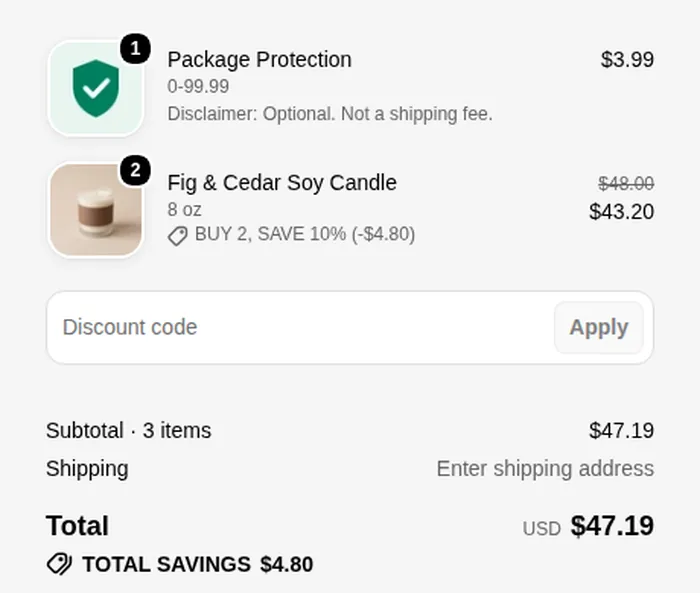
- Turn it on and test a cart. Add a product, click Protected checkout, and check that the checkout total matches the price on the button.

The manual way, without an app
- In Products, create a product called Shipping protection. Uncheck This is a physical product, turn off inventory tracking, and set the price you want shoppers to pay.
- Publish it to the Online Store and link to it from your cart page or your shipping policy, so shoppers can find it.
Drawbacks of the manual way
- Shoppers must find it and add it themselves. It is a product page, not a switch in front of them at checkout.
- It is not in the cart drawer. Shoppers who check out from the drawer never see it.
- No price by cart value. One product, one price, whether the cart is $20 or $400.
- It can be bought alone. Shopify lets anyone buy any active product on its own, so an order can come in with only the protection and nothing to ship.
- Nothing marks it as fulfilled. You fulfill the protection by hand on every order, or your orders stay half done.
A developer can add a checkbox to your cart instead. That only works in the theme it was built for, has to be redone after a theme change, and the other drawbacks above stay.
App or by hand
| Happy Bundle | By hand | |
|---|---|---|
| Cost | Free, no per-order charge, no cap | Free |
| Who keeps what shoppers pay | Your store, 100% | Your store, 100% |
| Where shoppers see it | Two checkout buttons (or a switch) in the cart drawer and on the cart page | A product page they have to find |
| Price for that cart | By cart value or percent, built in | One price for every cart |
| Orders with only the protection | Stopped at checkout | Can be bought alone |
| Protection marked as fulfilled | Automatically | By hand on every order |
Questions merchants ask
How do I add a package protection fee to the cart in Shopify?
Sell the protection as a product and offer it in the cart. Happy Bundle does this for free: add a Package protection offer and set the price, and your checkout button becomes Protected checkout and Checkout without protection.
How do I add an optional shipping insurance checkbox to my Shopify cart?
Happy Bundle offers two checkout buttons or a one-tap switch rather than a checkbox; both leave the choice to the shopper. Without an app, a developer can add a checkbox to your cart that adds a hidden protection product. It is not an insurance policy, so name it shipping protection or package protection.
Does Shopify have built-in shipping protection?
Shopify has no cart setting for optional protection. Stores add it as a product, with an app or with custom work on the theme.
Should the protection product ship or be taxed?
It should not ship: uncheck the physical product box, so it adds no weight and never counts as something to send. Happy Bundle's product is made that way and is not taxed. Ask your accountant how your country treats what shoppers pay for it.
Does it work with express checkout buttons?
Yes with Happy Bundle. Protection is a real item in the cart, so the cart, express buttons and the checkout all show the same total.
Read next
- Package protection, freeKeep 100% of what shoppers pay
- Protection-only ordersStop checkouts with only the protection
- Product add-onsGift wrap or a case on the product page
Try Happy Bundle on your store
Install it from the Shopify App Store and create your first offer. Free forever for stores that install now. Every feature, no revenue cap. If paid plans come later, they are only for new stores. Yours stays free.
happy