
Add-ons next to the add to cart button
Offer the extras that go with a product: refills, a case, gift wrap, a care kit. Shoppers tick an add-on or choose how many, and it goes into the cart with the product.
happy
Free forever for stores that install now. Every feature, no revenue cap. If paid plans come later, they are only for new stores. Yours stays free.
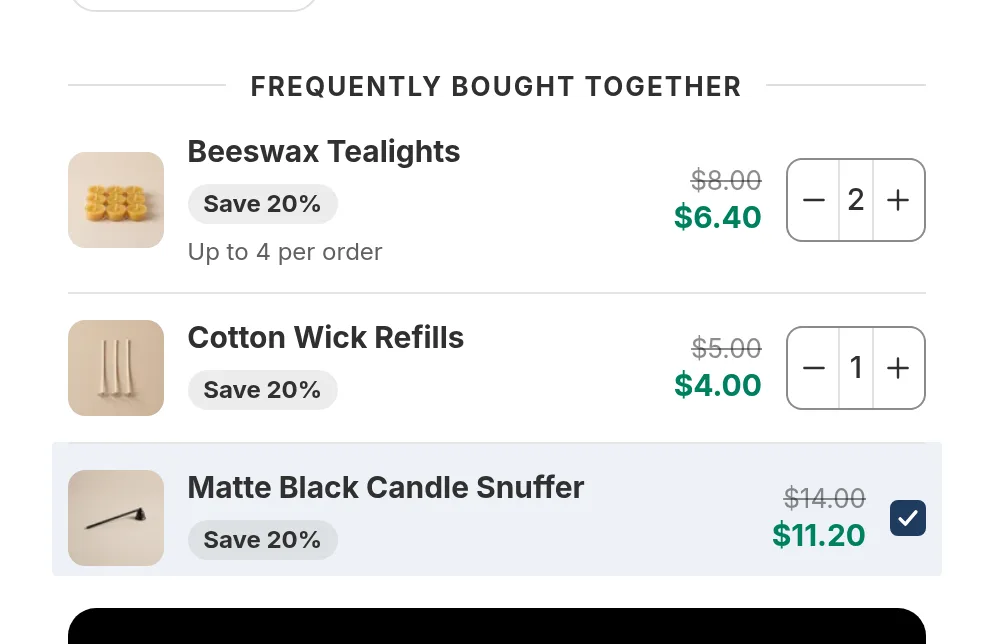
What you can set
- A checkbox for single extras, or a quantity stepper with a maximum per order (for example up to 4 tealights). The maximum is checked again at checkout.
- A discount on the add-on, for example 20% off refills bought with the candle.
- Unlisted products work as add-ons, so gift wrap or a care card does not need its own page in your store.
- Add-on offers can also show in the cart, if you switch that on.
- Want suggestions from your own orders? See frequently bought together.
Questions merchants ask
How do I add paid add-ons like gift wrap to a Shopify product page?
Create an add-on offer in Happy Bundle, choose the main products and the add-on products, and set a price or discount. The add-ons show under the product with a checkbox or a quantity stepper.
Can an add-on be a product that is not visible in my store?
Yes. Unlisted products work as add-ons.
Can shoppers choose more than one of an add-on?
Yes, with a quantity stepper. You can set a maximum per order.
Read next
- Frequently bought togetherAdd-ons picked from your orders
- Product bundlesA fixed set at one price
- Free giftsA gift at a tier
Try Happy Bundle on your store
Install it from the Shopify App Store and create your first offer. Free forever for stores that install now. Every feature, no revenue cap. If paid plans come later, they are only for new stores. Yours stays free.
happy